Enterprise-managed authorization
Enterprise-managed authorization (EMA) is an alternative to the OAuth 2.0 authorization code flow, defined as an extension on top of the Model Context Protocol (MCP). It removes the need for your users to individually authorize your app to access the Slack MCP server.
Instead, your app can request special tokens ("ID-JAGs") for a user logged in via an identity provider (IdP) like Okta. These ID-JAGs can be passed into the Slack user token endpoint and exchanged for short-lived tokens with which to access the Slack MCP server. Once the user has logged in to the IdP, this process is transparent to them.
Feature comparison
| Behavior | Authorization code flow | Enterprise-managed authorization |
|---|---|---|
| Types of tokens | Bot and user tokens for API and MCP server | User tokens for MCP server |
| How authorization is granted | User reviews scope grants and explicitly authorizes via web form | IdP admins define what permissions are granted to users for each MCP server |
| App installations | Workspace and organization | Organization only |
Enabling your app for enterprise-managed authorization
For EMA to work with your app, you need to mark it as supported in the app configuration.
Your app can be marked as supporting EMA via the app settings in the OAuth and Permissions section by toggling it on:
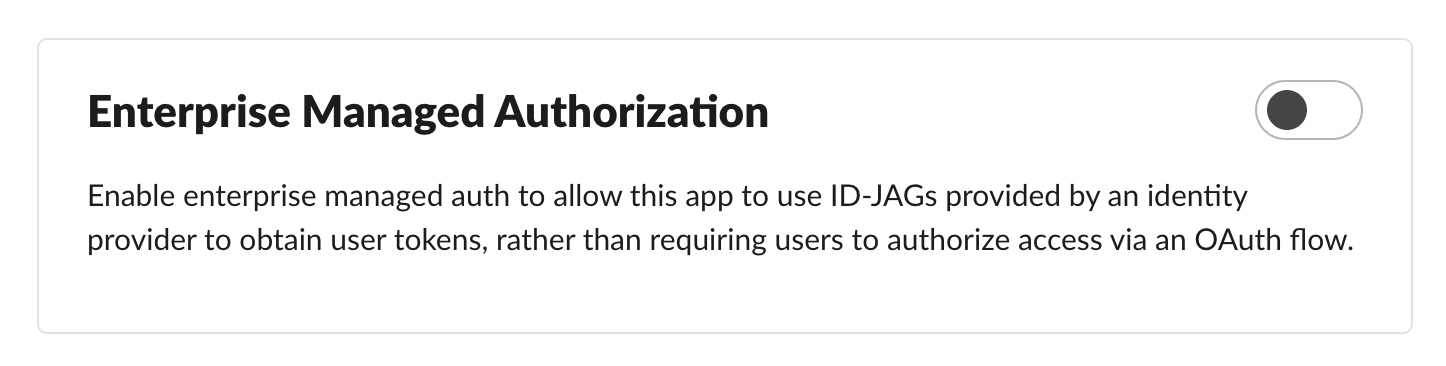 or by setting the
 is_enterprise_managed_auth_supported property in the oauth_config section of the manifest to true.
- JSON
- YAML
{
    …
    "oauth_config": {
        "is_enterprise_managed_auth_supported": true
    },
    …
}
…
oauth_config:
  is_enterprise_managed_auth_supported: true
…
Getting a user token for the MCP server
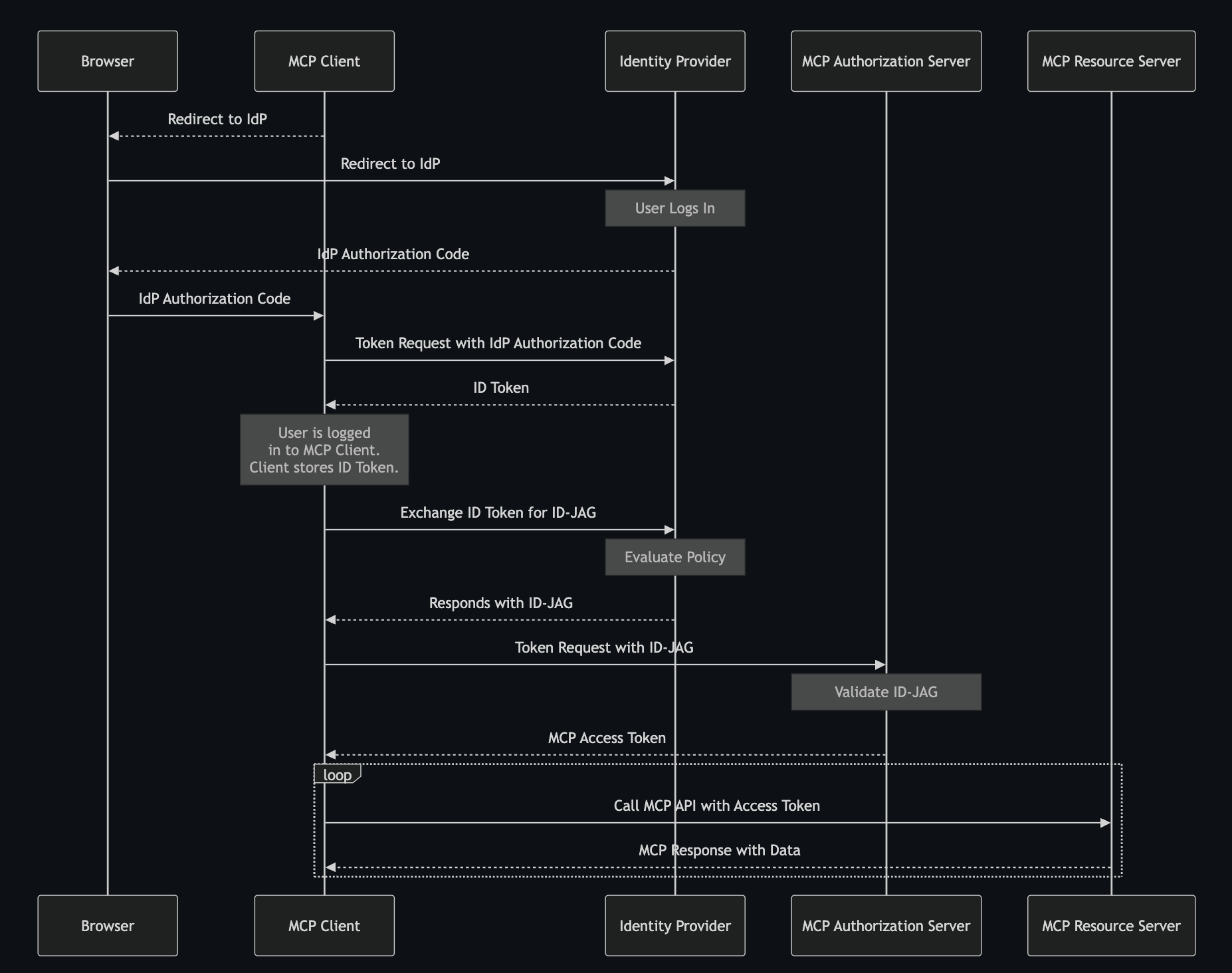
Like the authorization code flow, getting a user token via EMA is a three-step process:
- Request an identity credential from the IdP.
- Exchange the identity credential for an ID-JAG.
- Exchange the ID-JAG for an access token.
Request an identity credential from the IdP
You will need to get a credential identifying the user from the IdP. This may either be an OpenID Connect ID token or an OAuth 2.0 refresh token.
If your app supports Single Sign-On (SSO) and a user has signed in using it, you already have a user credential.
- If the user signed in via OpenID Connect, you already have an OpenID Connect ID token and you can skip to the next section.
- If the user signed in via SAML 2.0, you will need to exchange the assertion for a refresh token as explained in Section 4.5 of the Identity Assertion JWT Authorization Grant spec.
If your app does not support SSO, you will need to add support for providing IdP configurations and logging a user in to a configured IdP. The User Authentication section of the EMA specification provides a cursory example of an OpenID Connect exchange. A fuller explanation of how to implement OpenID Connect or SAML 2.0 to get user identity credentials from an IdP is beyond the scope of this doc, but is covered by a number of other guides available online.
Exchange the identity credential for an ID-JAG
You now need to exchange the identity token for an ID-JAG (a token that Slack will trust). This is done by making a call to the token endpoint for the IdP's authorization server. If you don't have the token endpoint URL set explicitly as part of IdP configuration, it may be published at the well-known URL for the authorization server; e.g., https://acme.idp.example/.well-known/oauth-authorization-server
At a minimum, you'll need to provide the following parameters:
| Parameter | Value |
|---|---|
requested_token_type | urn:ietf:params:oauth:token-type:id-jag |
audience | https://mcp.slack.com/ |
subject_token | The identifying credential you acquired in the previous step |
subject_token_type | One of:
|
grant_type | urn:ietf:params:oauth:grant-type:token-exchange |
- You will likely want to provide a
scopeparameter as well with a space-separated set of scopes that the user is requesting. - You will need to provide parameters that identify your app to the IdP; e.g., a
client_id/client_secretpair or aclient_assertionJWT signed with your private key.
An example request looks like this:
POST /oauth2/token HTTP/1.1
Host: acme.idp.example
Content-Type: application/x-www-form-urlencoded

grant_type=urn:ietf:params:oauth:grant-type:token-exchange
&requested_token_type=urn:ietf:params:oauth:token-type:id-jag
&audience=https://mcp.slack.com/
&scope=chat:write+reactions:read
&subject_token=eyJraWQiOiJzMTZ0cVNtODhwREo4VGZCXzdrSEtQ...
&subject_token_type=urn:ietf:params:oauth:token-type:id_token
&client_id=2ec954a1d60620116d36d9ceb7
&client_secret=a26d84873504215a34a86d52ef5cd64f4b76
If the request succeeds, you will get a JSON response. The access_token field contains the ID-JAG. Please do not modify the ID-JAG; Slack will not accept it if it has been altered.
Sample response:
{
    "issued_token_type": "urn:ietf:params:oauth:token-type:id-jag",
    "access_token": "eyJhbGciOiJIUzI1NiIsI...",
    "token_type": "N_A",
    "scope": "chat:write",
    "expires_in": 300
}
The scopes on the ID-JAG may not be the ones requested. This is subject to the policies configured at the IdP.
Exchange the ID-JAG for an access token
The last step is the same as in the OAuth 2.0 authorization user-centric code flow: call the oauth.v2.user.access endpoint. The difference here is that instead of providing a code parameter and an authorization_code grant type, we provide the ID-JAG as the assertion parameter and a urn:ietf:params:oauth:grant-type:jwt-bearer grant type. For example:
POST /api/oauth.v2.user.access HTTP/1.1
Host: slack.com

grant_type=urn:ietf:params:oauth:grant-type:jwt-bearer
&assertion=eyJhbGciOiJIUzI1NiIsI…
&client_id=1234567890.2345678901
&client_secret=foobarbaz…
If this succeeds, the endpoint will return a JSON response with the access token in the access_token property and the issued scopes in the scope property.
Example:
{
    "token_type": "Bearer",
    "access_token": "xoxp-foo-bar-…",
    "expires_in": 3600,
    "scope": "chat:write"
}
The access tokens retrieved via EMA are short-lived (an hour at the time of writing, though that may change). The identity credential obtained for the user earlier (the OpenID Connect ID token or refresh token) is long-lived. You will need to add support for retrieving new access tokens using the identity credential frequently.