Developing apps with Enterprise Search features
Read on to learn how to configure your apps to use Enterprise Search features.
The search object
Your app must include the search object within the features block of its app manifest. This object links the search functionality in Slack to specific custom steps defined by your app.
| Field | Description | Required |
|---|---|---|
search_function_callback_id | The callback_id of the function executed whenever Slack needs to collect search results from your app. | Required |
search_filters_function_callback_id | The callback_id of the function executed to return the available filters for your search functionality. | Optional |
In your app manifest, it may look something like this:
- JSON
- YAML
...
"features": {
    "search": {
        "search_function_callback_id": "id123456",
        "search_filters_function_callback_id": "id987654"
    }
}
...
features:
  search:
    search_function_callback_id: id123456
    search_filters_function_callback_id: id987654
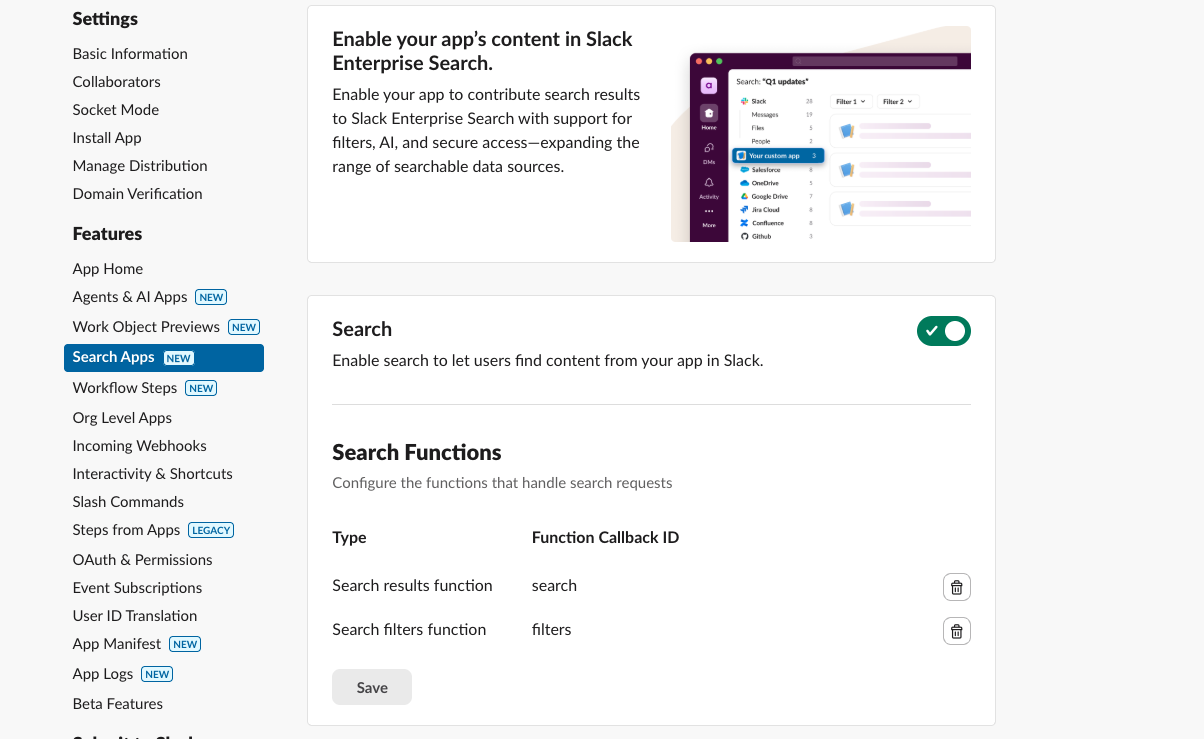
If you already have a custom step for returning search results in your Slack app, you can use the Search Apps view within app settings to configure your app as a search app. Note that apps containing Enterprise Search cannot be distributed publicly or submitted to the Slack Marketplace.
Implementing Enterprise Search
Before we can create custom steps for search functionality in your app, we first need to ensure your app is subscribed to the function_executed event.
To do this, update your app manifest as follows:
- JSON
- YAML
...
  "settings": {
      "org_deploy_enabled": true,
      "event_subscriptions": {
          "bot_events": [
              ...
              "function_executed",
              "entity_details_requested"
          ]
      },
      "app_type": "remote",
      "function_runtime": "remote"
  }
...
settings:
  org_deploy_enabled: true
  event_subscriptions:
    bot_events:
      # ...
      - function_executed
      - entity_details_requested
  app_type: remote
  function_runtime: remote
Each app must define a single custom step function in its app manifest that returns search results. The function's callback_id can then be referenced as the search_function_callback_id in the app manifest.
Input parameters
| Field | Description | Type | Required |
|---|---|---|---|
query | The query string provided by the end user when performing their search. | string | Required |
filters | An object containing the key-value pair of the filters selected by the user when interacting with search. | object | Optional |
* | Any additional input parameter with type slack#/types/user_context, regardless of its name, will be set to the user_context value of the user executing the search. | slack#/types/user_context | Optional |
When building an app using Enterprise Search features, you may find that the query input is different from the raw query input from the end user when they perform a search. This is because the query input to your search function is actually parsed and rewritten by Slack to align with other Slack searches (such as for native Slack content and built-in connectors), for security reasons, and for a better search experience.
Output parameters
The function requires a single output parameter search_results of type slack#/types/search_results, which contains an array of up to 50 search_results objects. All other output parameters are ignored.
The search_results object
| Field | Description | Type | Required |
|---|---|---|---|
external_ref | A unique identifier for referencing within the search results. See external_ref object. | object | Required |
title | A concise headline label. | string | Required |
description | Description of the search results. A cropped version of this description is used to help users identify the search results. In the case of AI answers, the entire description will be fed to the LLM to provide helpful information in natural language. | string | Required |
link | URI to allow users to navigate to the source of the search results. | string | Required |
date_updated | The creation date or last updated date of the search results in "YYYY-MM-DD" format. | string | Required |
content | Detailed content of search results. If provided, AI answers will use alongside title and description to generate more comprehensive search answers. | string | Optional |
The external_ref object
| Field | Description | Type | Required |
|---|---|---|---|
id | A unique identifier for referencing within the search results. If your app implements Work Objects, this should be same value used for that implementation. | string | Required |
type | An optional internal type for entity in the source system. Only needed if the ID is not globally unique or needed when retrieving the item. | string | Optional |
Invocations
The search function specified by the search_function_callback_id is triggered when users perform searches or modify search filters.
Slack caches successful search results for each user and query, for up to three minutes. Since search AI answers are generated from the search results, AI answers are also cached for those three minutes.
Adding optional search filters
Apps can define a single custom step function that provides search filters available to users and passes them to the search function. The function's callback_id should be set as the search_filters_function_callback_id in the app manifest.
Input parameters
| Field | Description | Type | Required |
|---|---|---|---|
| * | Any input parameter with type slack#/types/user_context regardless of their field will be set to the user_context value of the user executing the search | slack#/types/user_context | Optional |
Output parameters
The function must define an output parameter named filter of the slack#/types/search_filters type. The slack#/types/search_filters type is an array of up to 5 filter objects. Any other output parameters will be ignored by search operations.
The filter object
| Field | Description | Type | Required |
|---|---|---|---|
name | A machine-readable unique name set by the developer to reference in the search function. | string | Required |
display_name | A human-readable name describing the filter in the search user interface. | string | Required |
display_name_plural | This is optional when the filter type is multi_select. When multiple options are selected, the filter label will use display_name_plural. If not provided, the filter label will use display_name instead. | string | Optional |
type | Can be multi_select or toggle. | string | Required |
options | An array of options used to define the context of a select, multi_select, or dropdown. See option object. | object | Required if type is multi_select, otherwise optional. |
The option object
| Field | Description | Type | Required |
|---|---|---|---|
name | A human-readable name describing the filter in the search user interface. | string | Required |
value | A unique identifier set by the developer to resolve in the search function. | string | Required |
Invocations
When a user selects the app in the search window and views its results, the function defined as search_filters_function_callback_id is called. Slack doesn't expect these filters to change while the user is in the same search context. For this reason, once the filters are received, they will be cached and the function won't be called again until the search context changes.
Slack caches successful filter results for each user for up to three minutes.
Handling events
To ensure fast search results delivery, apps must handle function_executed events synchronously. This means the app must complete the function's execution and and provide output parameters before acknowledging the event. This allows Slack to provide a snappy search experience to end users.
For optimal search response times we recommend the following implementation:
-
Your app receives the
function_executedevent request. -
Your app completes the function execution by sending a request to the
functions.completeSuccessorfunctions.completeErrorAPI method.- These methods notify Slack when a
function_executedevent completes. - The
functions.completeSuccessAPI method informs Slack that the event completed successfully and provides all search results found by the app. - The
functions.completeErrorAPI method provides Slack with a user-friendly error message and informs Slack that thefunction_executedevent completed with an error. The error message provided by your app will be displayed to the user on the search page. It can be any plain text value with links you think could be insightful to the user. For example: Authentication Required: Please visit https://getauthhere.slack.dev to authenticate your account. - Both methods will invalidate the provided workflow token, but apps can still use their bot tokens.
- These methods notify Slack when a
-
Your app acknowledges the event by responding to the event request.
- Your app must complete the function execution within 10 seconds.
Implementing Enterprise Search using Bolt
You can implement Enterprise Search using the Bolt framework for Node or Python.
Bolt for Python
When using Bolt for Python, developers can gain more control over the search function's acknowledgment behavior by setting two key parameters:
| Set parameter | Notes |
|---|---|
auto_acknowledge=False | This gives developers manual control over invoking ack(). |
ack_timeout=10 | This extends the default timeout from 3 to 10 seconds. |
Additionally, the complete and fail helper functions provide developers with a way to report success or failure back to Slack — they invoke the functions.completeSuccess and functions.completeError API methods.
Sample app
To create a sample app in Python using the available template, refer to the sample app's readme.
Bolt for Node
When using TypeScript or JavaScript, developers can gain more control over the search function's acknowledgment behavior by setting one parameter:
| Set parameter | Notes |
|---|---|
auto_acknowledge=False | This gives developers manual control over invoking ack(). |
This is particularly useful when using Socket Mode, or when you need to handle the function_executed event within the default 3-second timeout.
Sample app
To create a sample app in TypeScript using the available template, refer to the sample app's readme.
Connection reporting
Refer to the connection reporting guide to learn more about building your own connection-enabled app using Enterprise Search.
Work Objects support
Refer to support for Enterprise Search for more details.