Work Objects overview
One of the primary ways to share external content within Slack is by posting URL links in conversations. However, links in their primitive form don't provide a lot of information. That's why we originally introduced link unfurling, so that Slack apps could provide rich previews and actions inside of conversations without requiring users to click the link. With Work Objects, apps can take the unfurling experience even further.
Work Objects can represent any type of entity or data other than conversations within Slack. Examples include files, tasks, and incidents. Work Objects aim to standardize the presentation of these entities inside Slack and to provide users with richer previews and greater feature extensibility.
Work Objects have two primary components: the unfurl component, and the flexpane component.
The unfurl component
Work Objects appear when a link is unfurled in a conversation. Each Work Object is represented by an entity, such as the Task entity. Entities can be customized to preview a variety of information. The full list of supported entities can be found in the supported entity types section.
Similar to link unfurls, the content of a Work Object is visible to everyone in the conversation. Therefore, it's important to avoid sending sensitive information and to ensure the content is relevant to all users.
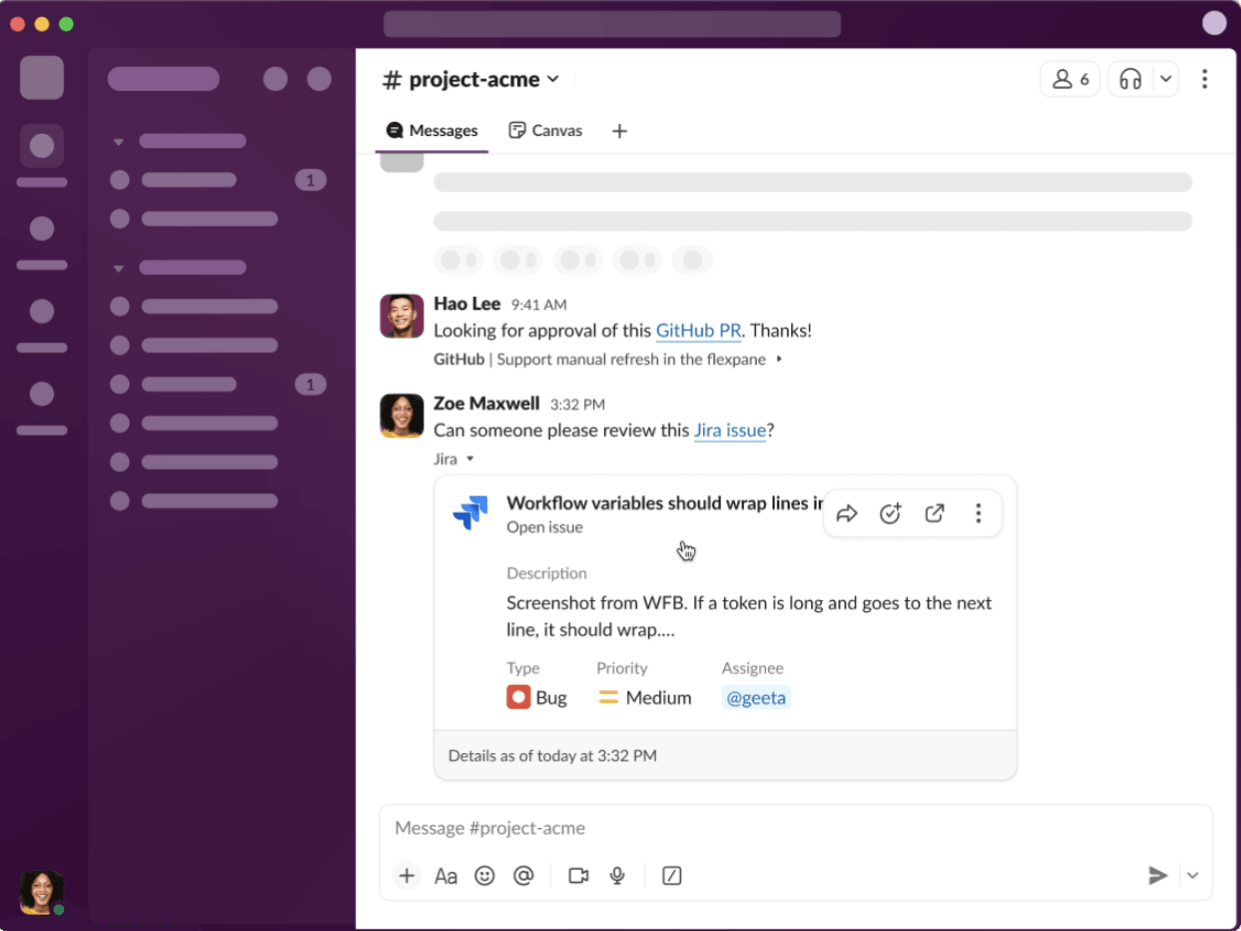
For full implementation details, refer to implementing Work Objects.
The flexpane component
When a user clicks on a Work Object unfurl, a flexpane opens on the right side of Slack to reveal more content. This new surface provides an additional layer of rich contextual information and customization options for apps.
It can also optionally require user authentication into a third-party service, which is useful in scenarios where the flexpane may display sensitive information. As general guidance, any information that you would not like to show in the unfurl can be shown in the flexpane following authentication. The flexpane also aggregates any related conversations where this Work Object resource has been referenced in Slack.
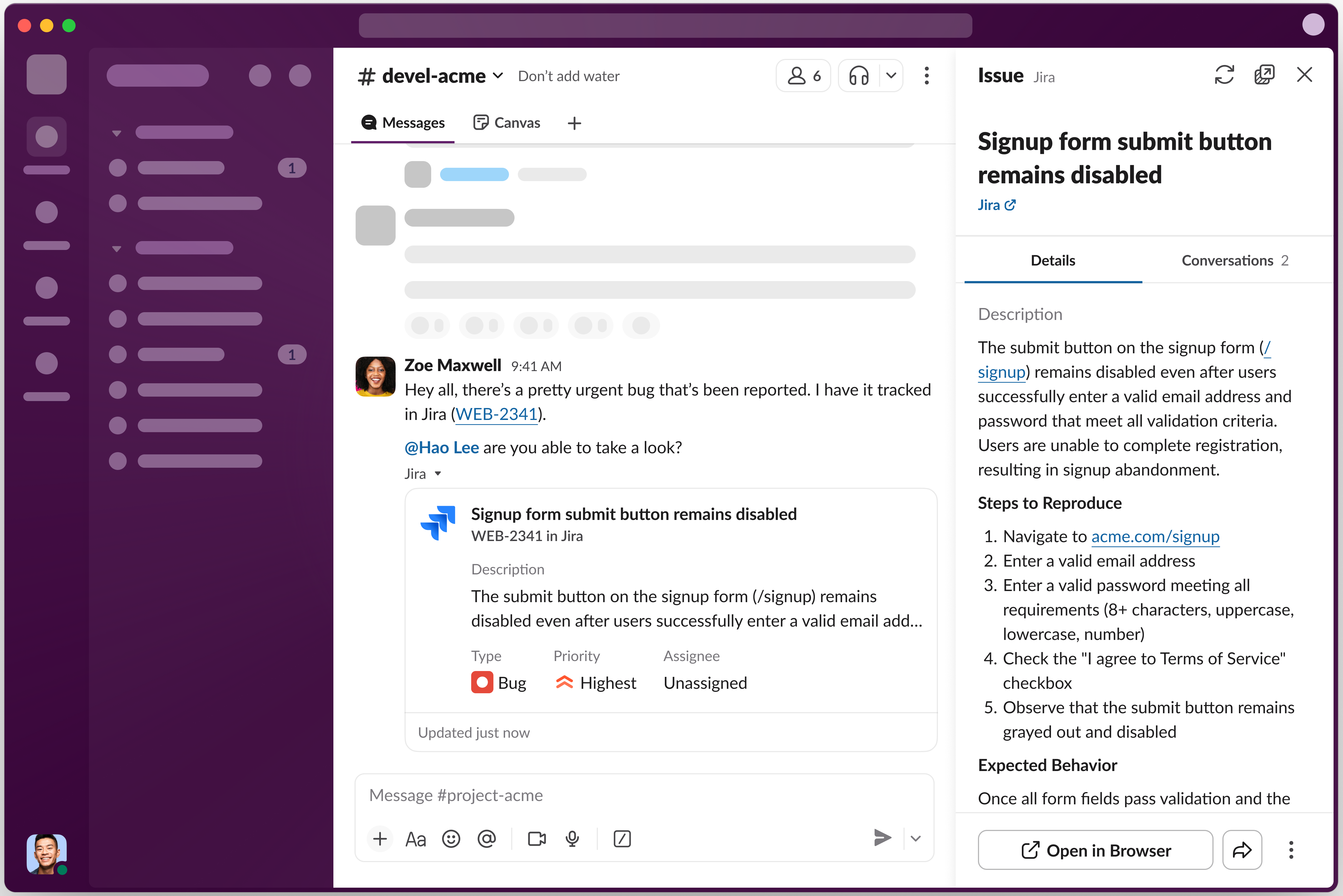
The flexpane can also render fully interactive content inside a sandboxed iframe. For details, refer to Work Objects embeds.
For full implementation details, refer to implementing Work Objects.
Slack SDKs
Work Object support is also available in the Bolt for JavaScript and Bolt for Java frameworks, and is coming soon to the Bolt for Python framework.
Bolt for JavaScript
When responding to the link_shared event, pass Work Object entity metadata into the chat.unfurl API method as follows:
await client.chat.unfurl({
    channel: event.channel,
    ts: event.message_ts,
    metadata: { entities: [entity_metadata] }
});
When a user opens the flexpane, you'll receive the entity_details_requested event. When responding to the event, call the entity.presentDetails API method as follows:
client.entity.presentDetails({
  trigger_id: event.trigger_id,
  metadata: entity_metadata
});
To support editing entities within Slack, subscribe to the view_submission event. In your handler, apply the edits from the event payload and call the entity.presentDetails API method to update the data in the flexpane accordingly. The view callback ID for work object edits is work-object-edit:
app.view('work-object-edit', viewSubmissionCallback);
Bolt for Java
When responding to the link_shared event, pass Work Object entity metadata into the chat.unfurl API method:
public class LinkSharedListener implements BoltEventHandler<LinkSharedEvent> {

    EntityMetadata entity = ...;
    EntityMetadata[] entities = {entity};
    UnfurlMetadata metadata = UnfurlMetadata.builder().entities(entities).build();

    ChatUnfurlRequest request = ChatUnfurlRequest.builder()
                        .token(ctx.getBotToken())
                        .channel(ctx.getChannelId())
                        .ts(payload.getEvent().getMessageTs())
                        .metadata(metadata)
                        .build();

    var response = ctx.client().chatUnfurl(request);

}
When a user opens the flexpane, you'll receive the entity_details_requested event (EntityDetailsRequestedEvent). When responding to the event, call the entity.presentDetails API method as follows:
public class EntityDetailsRequestedListener implements BoltEventHandler<EntityDetailsRequestedEvent> {

    EntityMetadata metadata = EntityMetadata.builder()
                        .entityType(...)
                        .appUnfurlUrl(...)
                        .url(...)
                        .externalRef(...)
                        .entityPayload(...)
                        .build();

    EntityPresentDetailsRequest request = EntityPresentDetailsRequest.builder()
                        .token(ctx.getBotToken())
                        .triggerId(payload.getEvent().getTriggerId())
                        .metadata(metadata)
                        .build();

    var response = ctx.client().entityPresentDetails(request);

}
To support editing entities within Slack, subscribe to the view_submission event. Apply the changes to your metadata and call the entity.presentDetails API method (entityPresentDetails) to update the flexpane accordingly:
public Response apply(ViewSubmissionRequest req, ViewSubmissionContext ctx) {
   // User edits can be found in req.getPayload().getView().getState().getValues();
   ...
   var response = ctx.client().entityPresentDetails(request);
}
The view callback ID for work object edits is work-object-edit:
app.viewSubmission("work-object-edit", new WorkObjectEditViewListener());
To post a message with a Work Object (rather than responding to a link unfurl), call the chat.postMessage API method with entity metadata set in the eventAndEntityMetadata parameter:
EntityMetadata entity = ...;
EntityMetadata[] entities = {entity};
EventAndEntityMetadata metadata = EventAndEntityMetadata.builder().entities(entities).build();

ChatPostMessageRequest request = ChatPostMessageRequest.builder()
                    .token(ctx.getBotToken())
                    .channel(ctx.getChannelId())
                    .text("Check out this entity:")
                    .eventAndEntityMetadata(metadata)
                    .build();

var response = ctx.client().chatPostMessage(request);
Support for Enterprise Search
To support Work Objects for your app's Enterprise Search results, traditional search results, and AI answers citations, your app must subscribe to the entity_details_requested event. You can define the type of Work Objects for your search results, such as an item, within the Work Object Previews view within app settings.
Once your app is subscribed to the entity_details_requested event, it can respond to the event and call the entity.presentDetails API method with Work Object metadata to launch the flexpane experience.
Get started using the sample apps mentioned here.
Slack Marketplace submission and launch considerations
- If your app already supports the link unfurls feature and has all the required scopes, workspace re-authentication is not needed for Work Object unfurls to appear in customer workspaces. Since the Work Objects feature requires a new event subscription, a new Slack Marketplace submission is required.
- The
external_refformat or IDs must not change for a given Work Object, as it is used for related conversations tracking. Slack scopes related conversations to the app sending the entity, so if you have multiple apps sending the same Work Object that you'd like to appear in the Related Conversations tab, then please let the Slack Marketplace team know when submitting the app.
More details are available here.